The Importance of Hardware Wallets and their Uses

In the ever-evolving world of cryptocurrencies, security is paramount for newcomers and seasoned investors. While the digital age has given us remarkable innovations, it has also ushered in new threats and vulnerabilities.
In the ever-evolving world of
cryptocurrencies, security is paramount for newcomers and seasoned investors.
While the digital age has given us remarkable innovations, it has also ushered
in new threats and vulnerabilities.
To safeguard your digital assets
effectively, you need a robust solution, and hardware wallets have emerged as
the gold standard in cryptocurrency security.
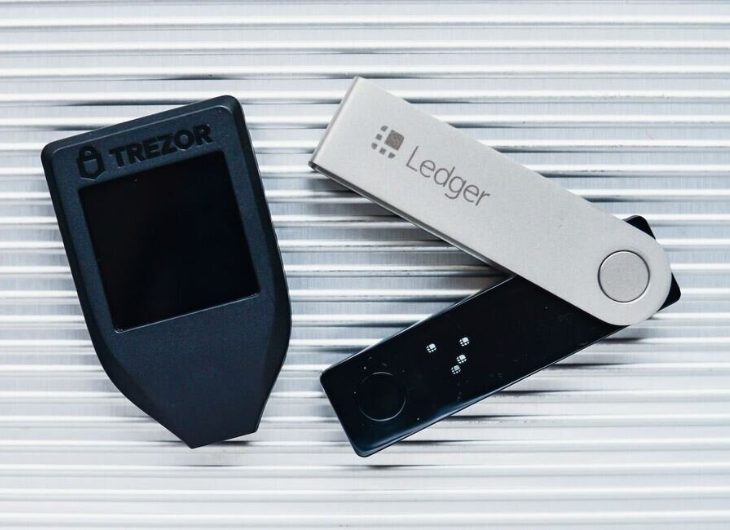
This comprehensive guide will delve into the importance and usage of hardware wallets and how Ledger`s products excel in this critical area.
Understanding the Cryptocurrency Security Landscape
Cryptocurrencies offer unparalleled financial freedom but also attract a range of cyber threats. These threats include hacking, phishing, malware attacks, and even physical theft. Unlike traditional financial systems, there are no banks or intermediaries to protect your digital assets. This is where hardware wallets come to the rescue.
What Are Hardware Wallets?
A hardware wallet is a physical device designed specifically for the secure storage of cryptocurrencies. Unlike software wallets, which run on your computer or smartphone and are connected to the internet, hardware wallets store your cryptocurrency offline. This isolation from online threats is the key to their security.
Why Are Hardware Wallets Essential?
1. Protection Against Hacking: Hardware wallets are immune to online hacking attempts because they
are never connected to the internet during normal use. This makes it nearly
impossible for cybercriminals to access your private keys to your
cryptocurrency kingdom.
2. Phishing and Malware Resistance: Software wallets are vulnerable to phishing attacks and malware
that can compromise your private keys. With their physical verification
mechanisms, hardware wallets are immune to such attacks.
3. Physical Security: If your hardware wallet is lost or stolen, it`s protected by a PIN
or passphrase. Even if someone gets hold of your device, they can`t access your
funds without your PIN or passphrase.
4. Peace of Mind: With a hardware wallet, you have complete control over your private keys, reducing the need to trust third-party exchanges or wallets. This ensures that you`re in charge of your financial destiny.
Ledger: The Trusted Name in Hardware Wallets
Regarding hardware wallets, Ledger has
earned its reputation as an industry leader. Here`s why Ledger`s products excel in the realm of
cryptocurrency security:
1. Proven Track Record
Ledger has been at the forefront of
cryptocurrency security since its inception in 2014. Ledger has established itself as a trusted
and reliable brand with millions of devices sold worldwide.
2. Robust Security Features
Ledger`s hardware wallets are equipped with
state-of-the-art security features, including secure chip technology, secure
boot, and a certified secure element. These features protect your private keys
from physical attacks.
3. User-Friendly Interface
Ledger`s user-friendly interface,
accessible via the Ledger Live app, simplifies the management of your
cryptocurrency portfolio. Even if you`re new to cryptocurrencies, Ledger`s products are designed to be
intuitive and easy to use.
4. Wide Range of Supported
Cryptocurrencies
Ledger supports a vast array of cryptocurrencies, ensuring that you can securely store and manage all your digital assets in one place.
How to Set Up Your Ledger Wallet: A Step-by-Step Tutorial
The
cryptocurrency revolution has ushered in a new financial freedom and security
era. However, ensuring the safety of your digital assets is paramount. That`s
where Ledger comes in with its hardware
wallets, designed to provide the highest level of security for your
cryptocurrencies.
Step 1: Unboxing Your Ledger Wallet
Your Ledger hardware wallet comes neatly packaged with everything you need to get started:
- Ledger hardware wallet(Nano S or Nano X)
- USB cable
- Recovery sheet
- Keychain strap
Step 2: Installing Ledger Live
To begin the setup process, you must install Ledger Live, Ledger`s official cryptocurrency management application, on your computer or smartphone. Ledger Live is available for Windows, macOS, Linux, iOS, and Android.
- Visit the Ledger Live download page on
Ledger`s official website.
- Choose the version compatible with your
operating system and download it.
- Install the application following the
on-screen instructions.
Step 3: Initializing Your Ledger Wallet
- Now that Ledger Live is installed follow
these steps to initialize your Ledger hardware wallet:
- Connect your Ledger wallet to your computer
or smartphone using the USB cable.
- Press the left or right button on your
Ledger device to select your preferred language.
- Confirm your selection by pressing both
buttons simultaneously.
Step 4: Choosing a PIN Code
- Setting a secure PIN code is crucial for
protecting your hardware wallet. Follow these guidelines when choosing your
PIN:
- Avoid using easily guessable codes like
"1234" or "0000."
- Use a PIN that is at least 4 to 8 digits
long.
- Never share your PIN with anyone, and never
store it electronically.
- Use the Ledger device to input your chosen
PIN code.
- Confirm your PIN code by entering it again.
Step 5: Backing Up Your Recovery Phrase
- Creating a recovery phrase is one of the
most critical steps in setting up your Ledger wallet. This phrase is your
backup if your hardware wallet is lost, stolen, or damaged. Follow these steps
carefully:
- Ledger Live will display a list of 24 words
on your computer or smartphone screen. Write down these words on the provided
recovery sheet in the correct order.
- Store this recovery sheet in a safe and
secure location, preferably offline. Do not store it digitally or share it with
anyone.
- Confirm the recovery phrase by selecting
the words in the correct order on your Ledger device.
Step 6: Installing Apps for Your Cryptocurrencies
- Your Ledger wallet can support multiple
cryptocurrencies but must install the corresponding apps. Here`s how:
- Open Ledger Live and connect your hardware
wallet.
- In Ledger Live, go to the "Manager"
section.
- Search for the cryptocurrency app you want
to install (e.g., Bitcoin, Ethereum) and click "Install."
Step 7: Transferring Cryptocurrency to Your Ledger Wallet
Now that your Ledger wallet is set up, you can transfer your cryptocurrencies to it from your exchange or existing wallet. Always double-check the receiving address on your Ledger Live app to ensure accuracy.
Security Best Practices:
- Keep Your Hardware Wallet Offline: Your Ledger wallet should only be connected to the internet when
necessary. Keep it disconnected when not in use to minimize exposure to
potential threats.
- Update Firmware: Regularly update your Ledger
device`s firmware through Ledger Live to ensure it has the latest security
enhancements.
- Use a Secure Computer: Always use a secure and malware-free computer or smartphone when
interacting with your Ledger wallet.
- Beware of Phishing: Be cautious of phishing attempts and only download Ledger Live
from the official website.
- Test with Small Amounts: When transferring large amounts of cryptocurrency, consider sending
a small test transaction first to ensure everything is set up correctly.
In the Wild West of cryptocurrencies, where security is paramount, hardware wallets like those offered by Ledger provide the much-needed fortress for your digital wealth. By keeping your private keys offline and out of reach of cybercriminals, you can sleep soundly knowing that your investments are safe. Ledger`s commitment to excellence in security and user experience makes it a top choice for cryptocurrency enthusiasts worldwide. Whether you`re a holder or a trader, investing in a Ledger hardware wallet is an investment in peace of mind and the secure future of your digital assets. By following these steps and adhering to security best practices, you can confidently set up and use your Ledger hardware wallet, knowing that your cryptocurrencies are secure and protected from potential threats. Ledger`s commitment to security and user-friendly design makes it a trusted choice for safeguarding your digital assets.
Recent Blogs
-

How to Choose a Health Tracker That Actually Helps You Improve Your Wellness
-

How to Choose Stylish Sneakers That Stay Comfortable All Day
-

Looking for a Simple Camera for Outdoor Adventures? Here’s What Most People Get Wrong
-
How to Choose the Right Health Optimizer App (Without Wasting Time or Money)
-

How to Choose the Right Shoes for Comfort, Grip & Performance (Without Wasting Money)